Getting started with Docker
Introduction
Docker is software for automating the deployment and management
of applications in environments with containerization support.
It allows you to «package» an application with all its environment and
dependencies into a container, which can be transferred to any
Linux
system with cgroups support in the kernel, and also provides
an environment for managing containers.
Initially it used the capabilities of
LXC; since 2015 it has used its own library that abstracts
the virtualization capabilities of the Linux kernel — libcontainer.
With the advent of the Open Container Initiative, the transition from a monolithic
to a modular architecture began.
It is developed and maintained by a company-startup of the same name,
and is distributed in two editions — community (Community Edition)
under the Apache 2.0 license and for organizations (Enterprise Edition) under
a proprietary license. It is written in
Go
.
Guide to working with Docker from Beget.com
Check the version
docker version
Client: Docker Engine - Community Version: 19.03.8 API version: 1.40 Go version: go1.12.17 Git commit: afacb8b Built: Wed Mar 11 01:23:10 2020 OS/Arch: windows/amd64 Experimental: false Server: Docker Engine - Community Engine: Version: 19.03.8 API version: 1.40 (minimum version 1.12) Go version: go1.12.17 Git commit: afacb8b Built: Wed Mar 11 01:29:16 2020 OS/Arch: linux/amd64 Experimental: false containerd: Version: v1.2.13 GitCommit: 7ad184331fa3e55e52b890ea95e65ba581ae3429 runc: Version: 1.0.0-rc10 GitCommit: dc9208a3303feef5b3839f4323d9beb36df0a9dd docker-init: Version: 0.18.0 GitCommit: fec3683
docker info
Client: Debug Mode: false Server: Containers: 1 Running: 1 Paused: 0 Stopped: 0 Images: 18 Server Version: 19.03.8 Storage Driver: overlay2 Backing Filesystem: <unknown> Supports d_type: true Native Overlay Diff: true Logging Driver: json-file Cgroup Driver: cgroupfs Plugins: Volume: local Network: bridge host ipvlan macvlan null overlay Log: awslogs fluentd gcplogs gelf journald json-file local logentries splunk syslog Swarm: inactive Runtimes: runc Default Runtime: runc Init Binary: docker-init containerd version: 7ad184331fa3e55e52b890ea95e65ba581ae3429 runc version: dc9208a3303feef5b3839f4323d9beb36df0a9dd init version: fec3683 Security Options: seccomp Profile: default Kernel Version: 4.19.76-linuxkit Operating System: Docker Desktop OSType: linux Architecture: x86_64 CPUs: 2 Total Memory: 1.945GiB Name: docker-desktop ID: FBED:2SXW:VNQJ:PHNT:WYBQ:UICB:BJIW:4IMX:TCRW:3TJT:75VR:LISO Docker Root Dir: /var/lib/docker Debug Mode: true File Descriptors: 56 Goroutines: 68 System Time: 2020-07-14T19:48:22.671351094Z EventsListeners: 4 Registry: https://index.docker.io/v1/ Labels: Experimental: false Insecure Registries: 127.0.0.0/8 Live Restore Enabled: false Product License: Community Engine
Without sudo
To avoid typing sudo every time, run the following commands
sudo groupadd docker
sudo usermod -aG docker $USER
newgrp docker
Running a container
Containers in Docker are started with the command run
Run the hello-world container
docker run hello-world
Unable to find image 'hello-world:latest' locally latest: Pulling from library/hello-world 0e03bdcc26d7: Pull complete Digest: sha256:d58e752213a51785838f9eed2b7a498ffa1cb3aa7f946dda11af39286c3db9a9 Status: Downloaded newer image for hello-world:latest Hello from Docker! This message shows that your installation appears to be working correctly. To generate this message, Docker took the following steps: 1. The Docker client contacted the Docker daemon. 2. The Docker daemon pulled the "hello-world" image from the Docker Hub. (amd64) 3. The Docker daemon created a new container from that image which runs the executable that produces the output you are currently reading. 4. The Docker daemon streamed that output to the Docker client, which sent it to your terminal. To try something more ambitious, you can run an Ubuntu container with: $ docker run -it ubuntu bash Share images, automate workflows, and more with a free Docker ID: https://hub.docker.com/ For more examples and ideas, visit: https://docs.docker.com/get-started/
First Docker looked for the hello-world image on my computer, and when it did not find it, it downloaded it from the repository and ran it.
To get a list of all containers, run docker ps -a.
-a also outputs containers that are not currently running
docker ps -a
CONTAINER ID IMAGE COMMAND CREATED STATUS PORTS NAMES 85375f0f0e5e hello-world "/hello" 4 minutes ago Exited (0) 4 minutes ago elated_meninsky 33efc448ad6c docker101tutorial "/docker-entrypoint.…" 9 hours ago Up 9 hours 0.0.0.0:80->80/tcp docker-tutorial
docker images
You can get a list of top-level images, their tags, sizes and repositories by running
docker images
REPOSITORY TAG IMAGE ID CREATED SIZE andreyolegovichru/docker101tutorial latest dd2e76a16950 9 hours ago 26.8MB docker101tutorial latest dd2e76a16950 9 hours ago 26.8MB <none> <none> f5578f194936 9 hours ago 123MB <none> <none> 409d2b2d3c0b 9 hours ago 110MB <none> <none> c26bbf7dc236 9 hours ago 224MB python alpine fbfb63e3c6bb 17 hours ago 80.3MB nginx alpine ecd67fe340f9 4 days ago 21.6MB node 12-alpine 057fa4cc38c2 2 weeks ago 89.3MB hello-world latest bf756fb1ae65 6 months ago 13.3kB
Pull: downloading images
With the command pull you can download images without running them.
Download an image from Ubuntu
docker pull ubuntu
Using default tag: latest latest: Pulling from library/ubuntu 692c352adcf2: Pull complete 97058a342707: Pull complete 2821b8e766f4: Pull complete 4e643cc37772: Pull complete Digest: sha256:55cd38b70425947db71112eb5dddfa3aa3e3ce307754a3df2269069d2278ce47 Status: Downloaded newer image for ubuntu:latest docker.io/library/ubuntu:latest
Check whether the images were updated
docker images
REPOSITORY TAG IMAGE ID CREATED SIZE andreyolegovichru/docker101tutorial latest dd2e76a16950 19 hours ago 26.8MB docker101tutorial latest dd2e76a16950 19 hours ago 26.8MB <none> <none> f5578f194936 19 hours ago 123MB <none> <none> 409d2b2d3c0b 19 hours ago 110MB <none> <none> c26bbf7dc236 19 hours ago 224MB python alpine fbfb63e3c6bb 27 hours ago 80.3MB nginx alpine ecd67fe340f9 4 days ago 21.6MB ubuntu latest adafef2e596e 8 days ago 73.9MB node 12-alpine 057fa4cc38c2 2 weeks ago 89.3MB hello-world latest bf756fb1ae65 6 months ago 13.3kB
If you need not the latest image but some specific version, specify it after the colon.
For example, if you need Ubuntu 14.04
docker pull ubuntu:14.04
You can remove an image with the rmi command
docker rmi ubuntu:14.04
You can delete not by name but using the IMAGE ID, for example, if I want to remove the image hello-world whose IMAGE ID is bf756fb1ae65
docker rmi bf756fb1ae65
Image repository hub.docker.com
You can study the list of available images on the site
hub.docker.com
You need to click the button Explore in the top menu
hub.docker.com/search
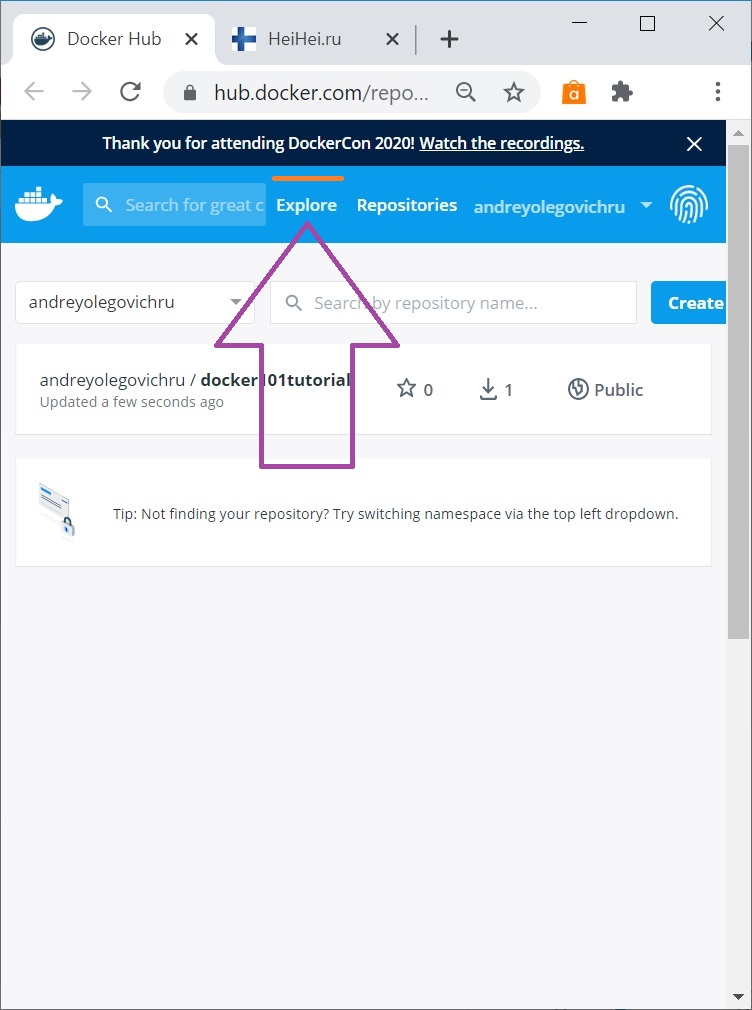
The list looks quite original:

There are a lot of images, I recommend using search or filters. Docker Certified means an official image.
For official images the names are given simply:
debian
,
python
,
php
and so on. This is called «Top Level Image»
If the source is not verified, for example, if I make some image, for example an application for the site
TopBicycle.ru
then the name will look like this: andreyolegovich/topbicycle-ru
That is, first the author's name, then the image name. Not all companies verify images. For example,
load testing software
Yandex Tank
is published as direvius/yandex-tank
Starting, stopping and removing containers
For example, when a container is in the Exited state, it can be started with the command start.
In general, all the commands are intuitive.
docker start container_name
docker stop container_name
docker restart container_name
docker rm container_name
You can delete by id or only by its initial characters
You can exit the container by pressing simultaneously
CTRL + P + Q
logs
By default logs flow right in the console, but if the container is started with the flag -d they are not visible. You can study the logs with the command logs
docker logs container_name
docker log container_id
Article author: Andrei Olegovich
