Getting started with Docker
Check the version
docker version
Client: Docker Engine - Community Version: 19.03.8 API version: 1.40 Go version: go1.12.17 Git commit: afacb8b Built: Wed Mar 11 01:23:10 2020 OS/Arch: windows/amd64 Experimental: false Server: Docker Engine - Community Engine: Version: 19.03.8 API version: 1.40 (minimum version 1.12) Go version: go1.12.17 Git commit: afacb8b Built: Wed Mar 11 01:29:16 2020 OS/Arch: linux/amd64 Experimental: false containerd: Version: v1.2.13 GitCommit: 7ad184331fa3e55e52b890ea95e65ba581ae3429 runc: Version: 1.0.0-rc10 GitCommit: dc9208a3303feef5b3839f4323d9beb36df0a9dd docker-init: Version: 0.18.0 GitCommit: fec3683
docker info
Client:
Debug Mode: false
Server:
Containers: 1
Running: 1
Paused: 0
Stopped: 0
Images: 18
Server Version: 19.03.8
Storage Driver: overlay2
Backing Filesystem:
Running a container
Containers are run in Docker with the command run
Run the hello-world container
docker run hello-world
Unable to find image 'hello-world:latest' locally latest: Pulling from library/hello-world 0e03bdcc26d7: Pull complete Digest: sha256:d58e752213a51785838f9eed2b7a498ffa1cb3aa7f946dda11af39286c3db9a9 Status: Downloaded newer image for hello-world:latest Hello from Docker! This message shows that your installation appears to be working correctly. To generate this message, Docker took the following steps: 1. The Docker client contacted the Docker daemon. 2. The Docker daemon pulled the "hello-world" image from the Docker Hub. (amd64) 3. The Docker daemon created a new container from that image which runs the executable that produces the output you are currently reading. 4. The Docker daemon streamed that output to the Docker client, which sent it to your terminal. To try something more ambitious, you can run an Ubuntu container with: $ docker run -it ubuntu bash Share images, automate workflows, and more with a free Docker ID: https://hub.docker.com/ For more examples and ideas, visit: https://docs.docker.com/get-started/
First Docker looked for the hello-world image on my computer; when it did not find it, it downloaded it from the repository and ran it.
docker ps -a
CONTAINER ID IMAGE COMMAND CREATED STATUS PORTS NAMES 85375f0f0e5e hello-world "/hello" 4 minutes ago Exited (0) 4 minutes ago elated_meninsky 33efc448ad6c docker101tutorial "/docker-entrypoint.…" 9 hours ago Up 9 hours 0.0.0.0:80->80/tcp docker-tutorial
docker images
REPOSITORY TAG IMAGE ID CREATED SIZE andreyolegovichru/docker101tutorial latest dd2e76a16950 9 hours ago 26.8MB docker101tutorial latest dd2e76a16950 9 hours ago 26.8MB <none> <none> f5578f194936 9 hours ago 123MB <none> <none> 409d2b2d3c0b 9 hours ago 110MB <none> <none> c26bbf7dc236 9 hours ago 224MB python alpine fbfb63e3c6bb 17 hours ago 80.3MB nginx alpine ecd67fe340f9 4 days ago 21.6MB node 12-alpine 057fa4cc38c2 2 weeks ago 89.3MB hello-world latest bf756fb1ae65 6 months ago 13.3kB
Pull: downloading images
With the command pull you can download images without running them.
Download an Ubuntu image
docker pull ubuntu
Using default tag: latest latest: Pulling from library/ubuntu 692c352adcf2: Pull complete 97058a342707: Pull complete 2821b8e766f4: Pull complete 4e643cc37772: Pull complete Digest: sha256:55cd38b70425947db71112eb5dddfa3aa3e3ce307754a3df2269069d2278ce47 Status: Downloaded newer image for ubuntu:latest docker.io/library/ubuntu:latest
Check whether the images have been updated
docker images
REPOSITORY TAG IMAGE ID CREATED SIZE andreyolegovichru/docker101tutorial latest dd2e76a16950 19 hours ago 26.8MB docker101tutorial latest dd2e76a16950 19 hours ago 26.8MB <none> <none> f5578f194936 19 hours ago 123MB <none> <none> 409d2b2d3c0b 19 hours ago 110MB <none> <none> c26bbf7dc236 19 hours ago 224MB python alpine fbfb63e3c6bb 27 hours ago 80.3MB nginx alpine ecd67fe340f9 4 days ago 21.6MB ubuntu latest adafef2e596e 8 days ago 73.9MB node 12-alpine 057fa4cc38c2 2 weeks ago 89.3MB hello-world latest bf756fb1ae65 6 months ago 13.3kB
If you need not the latest image but some specific version, specify it after the colon.
For example, if you need Ubuntu 14.04
docker pull ubuntu:14.04
An image can be deleted with the rmi command
docker rmi ubuntu:14.04
You can delete not by name but by IMAGE ID, for example, if I want to delete the image hello-world whose IMAGE ID is bf756fb1ae65
docker rmi bf756fb1ae65
The image repository hub.docker.com
You can study the list of available images on the site
hub.docker.com
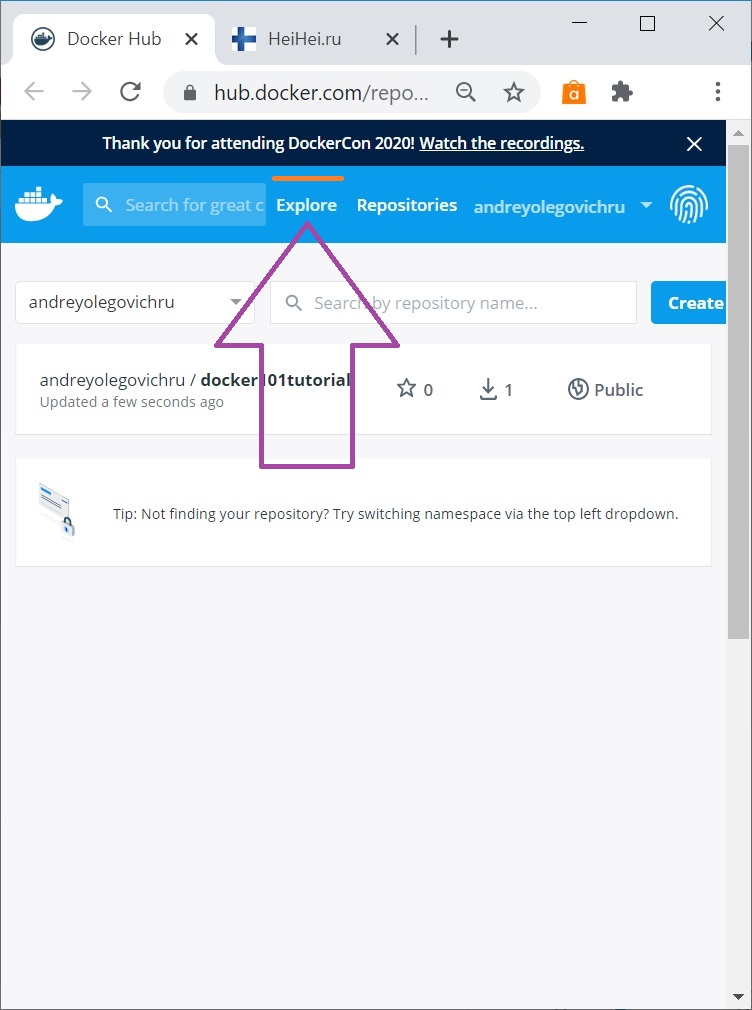
You need to click the button Explore in the top menu
hub.docker.com/search
The list looks quite original:

There are a lot of images, I recommend using the search or filters. Docker Certified means an official image.
Official images have simple names:
debian
,
python
,
php
and so on. This is called a «Top Level Image»
If the source is not verified, for example, if I make some image, for example an application for the site
TopBicycle.ru
then the name will look like this: andreyolegovich/topbicycle-ru
That is, first the author name, then the image name. Not all companies verify images. For example,
load testing software
Yandex Tank
is published as direvius/yandex-tank
Starting, stopping and removing containers
docker start container_name
docker stop container_name
docker rm container_name
You can exit a container by pressing at the same time
CTRL + P + Q
Article author: Andrei Olegovich


