Jenkins Pipeline
| Introduction | |
| Example | |
| Multibranch Pipeline | |
| Filter Branches | |
| when | |
| Credentials | |
| Related Articles |
Introduction
There are two types of Pipelines in Jenkins: Declarative and Scripted
One can easily distinguish them by the first line
Declarative Pipeline starts with word pipeline
pipeline { agent { } }
Scripted Pipeline starts with word node and contains Groovy script inside
node { // groovy script }
Pipeline
New Item → Pipeline
Create file Jenkinsfile.template and copy it's content to Pipeline → Definition → Pipeline script
pipeline { agent { node { label 'jenkins-agent-goes-here' } } stages { stage('Build') { steps { echo "Building.." sh ''' echo "doing build stuff.." ''' } } stage('Test') { steps { echo "Testing.." sh ''' echo "doing test stuff.." ''' } } stage('Deliver') { steps { echo 'Deliver....' sh ''' echo "doing delivery stuff.." ''' } } } }
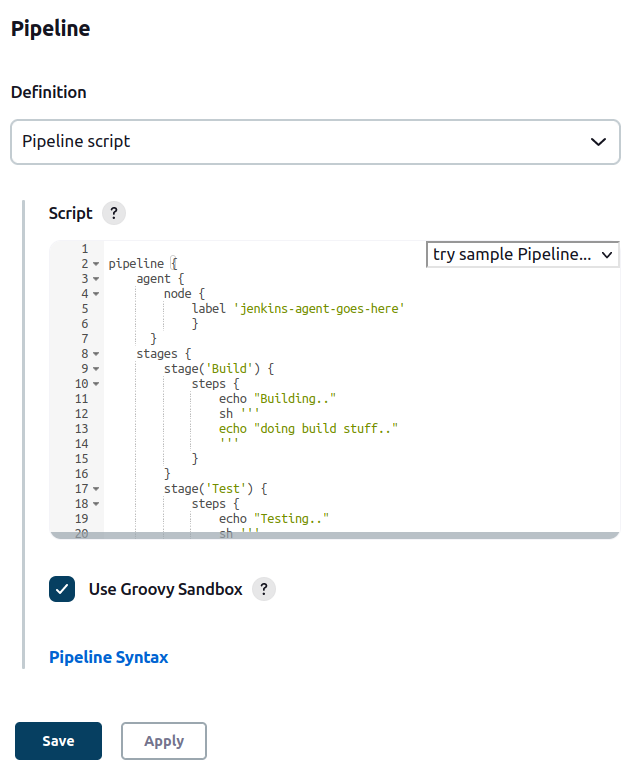
www.aredel.com
label should be replaced by your agent's label, that is suitable for the job. In the previous example we used demo-docker-slave agent, now we use different name: docker_slave_ssh
pipeline { agent { node { label 'docker_slave_ssh' } }
Build Pipeline and check the status
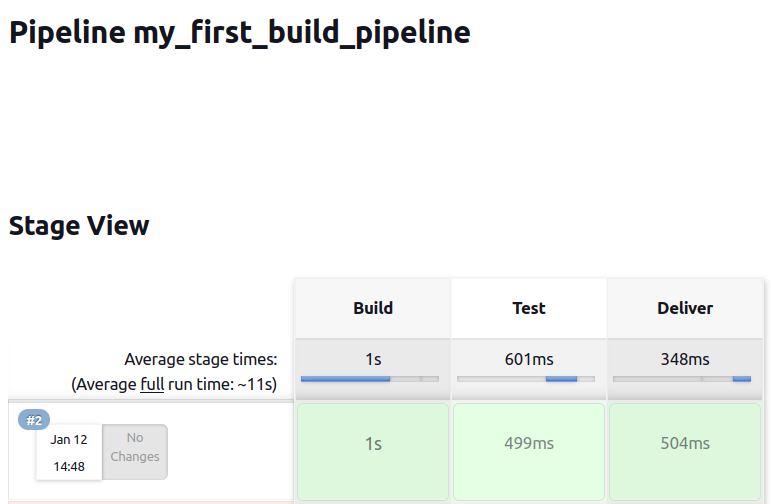
www.aredel.com
Add SCM trigger
pipeline { agent { node { label 'docker_slave_ssh' } } triggers { pollSCM 'H/5 * * * *' }
Change Pipeline Definition to Pipeline script from SCM
Then select Git as SCM and add you repo to Repository URL. If your repository is public
there is no need to set Credentials. If it is private you can add e.g. username and password
with the Credentials plugin.
Copy Jenkinsfile to remote repo
Set Jenkinsfile as a Script Path
Push changes to repo and build job manually (needed only for the first time).
Started by user andrei Obtained Jenkinsfile from git https://github.com/yourrepo/jenkins-docker-slave [Pipeline] Start of Pipeline [Pipeline] node Running on docker_slave_ssh-000i35hzxz96d on docker_ubuntu_esxi2 in /home/jenkins/workspace/my_first_build_pipeline [Pipeline] { [Pipeline] stage [Pipeline] { (Declarative: Checkout SCM) [Pipeline] checkout Selected Git installation does not exist. Using Default The recommended git tool is: NONE No credentials specified Cloning the remote Git repository Cloning repository https://github.com/yourrepo/jenkins-docker-slave > git init /home/jenkins/workspace/my_first_build_pipeline # timeout=10 Fetching upstream changes from https://github.com/yourrepo/jenkins-docker-slave > git --version # timeout=10 > git --version # 'git version 2.34.1' > git fetch --tags --force --progress -- https://github.com/yourrepo/jenkins-docker-slave +refs/heads/*:refs/remotes/origin/* # timeout=10 > git config remote.origin.url https://github.com/yourrepo/jenkins-docker-slave # timeout=10 > git config --add remote.origin.fetch +refs/heads/*:refs/remotes/origin/* # timeout=10 Avoid second fetch Checking out Revision 0854f332c3f88754a31a57c873bdb4402cff59b2 (refs/remotes/origin/master) > git rev-parse refs/remotes/origin/master^{commit} # timeout=10 > git config core.sparsecheckout # timeout=10 > git checkout -f 0854f332c3f88754a31a57c873bdb4402cff59b2 # timeout=10 Commit message: "QA: changes poll interval to 2 minutes in Jenkinsfile" First time build. Skipping changelog. [Pipeline] } [Pipeline] // stage [Pipeline] withEnv [Pipeline] { [Pipeline] stage [Pipeline] { (Build) [Pipeline] echo Building.. [Pipeline] sh + echo doing build stuff.. doing build stuff.. [Pipeline] } [Pipeline] // stage [Pipeline] stage [Pipeline] { (Test) [Pipeline] echo Testing.. [Pipeline] sh + echo doing test stuff.. doing test stuff.. [Pipeline] } [Pipeline] // stage [Pipeline] stage [Pipeline] { (Deliver) [Pipeline] echo Deliver.... [Pipeline] sh + echo doing delivery stuff.. doing delivery stuff.. [Pipeline] } [Pipeline] // stage [Pipeline] } [Pipeline] // withEnv [Pipeline] } [Pipeline] // node [Pipeline] End of Pipeline Finished: SUCCESS
Schedule should have fetched our rule
H/2 * * * *
Make some changes in the remote repo and wait five minutes.
Multibranch Pipeline
Typical project has more then one git branch . That is why it is common to use Multibranch Pipeline in Jenkins
Filter Branches
It is possible to select branches of interest for the Multibranch Pipeline by using
Dashboard → Pipeline Name → Configuration → Branch Sources → Discover branches → Filter by name (with regular expression)
Value
.*
Stands for all branches
And e.g.
^dev|master|feature.*$
Matches branches that start with dev or master or feature .
when
Every stage can rely on logicall conditions for execution. If condition is not matched the stage (e.g. "Test") will be skipped with the following log
Stage "Test" skipped due to when conditional
Example that checks for matching branch
stage('Test') { when { branch 'master' } steps { echo "Testing.." sh ''' echo "doing test stuff.." ''' } }
Multibranch Pipeline can use both branch and BRANCH_NAME variables
BRANCH_NAME For a multibranch project, this will be set to the name of the branch being built, for example in case you wish to deploy to production from master but not from feature branches; if corresponding to some kind of change request, the name is generally arbitrary (refer to CHANGE_ID and CHANGE_TARGET).
when { expression { env.BRANCH_NAME == 'dev' || env.BRANCH_NAME == 'master' } } steps { echo "Testing.." sh ''' echo $BRANCH_NAME ''' }
Add Groovy script to declarative Pipeline
You can use
Groovy
in Declarative Pipeline
All you need to do is to user script {} wrapper
stage('Test') { steps { echo "Testing.." script { def test = 2 + 2 > 3 ? 'hopefully' : 'unlikely' echo test } } }
Logs should have the word hopefully.
It is possible to use Replay function inside each build to test your scripts
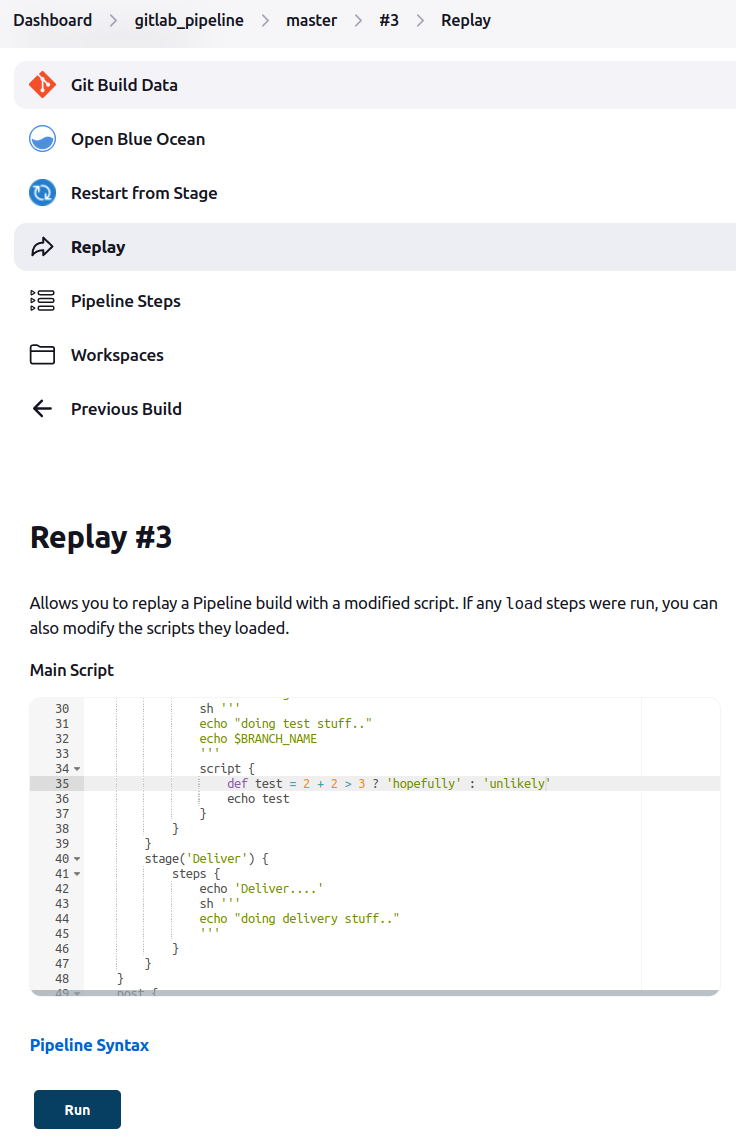
www.aredel.com
Credentials
Let's check how to use Credentials inside Jenkins Pipeline.
Creation of Credentials is described in
«Jenkins Credentials»
article.
pipeline { agent { node { label 'docker_slave_ssh' } } environment { SERVER_CREDENTIALS = credentials('esxi2-192') } stages { stage('Deploy') { steps { echo "Deploying with ${SERVER_CREDENTIALS} User: ${SERVER_CREDENTIALS_USR}" } } } }
… Deploying with **** User: andrei …
withCredentials() allows using Credentials not only globally but inside a specific stage as well.
pipeline { agent { node { label 'docker_slave_ssh' } } stages { stage('Test') { steps { echo "Testing.." withCredentials([ usernamePassword(credentialsId: 'esxi2-192', usernameVariable: 'MY_USER', passwordVariable: 'MY_PWD')]) { echo "USER: ${MY_USER} PWD: ${MY_PWD}" } } } } }
Masking supported pattern matches of $MY_PWD [Pipeline] { (hide) [Pipeline] echo Warning: A secret was passed to "echo" using Groovy String interpolation, which is insecure. Affected argument(s) used the following variable(s): [MY_PWD] See https://jenkins.io/redirect/groovy-string-interpolation for details. USER: andrei PWD: ****
| Jenkins | |
| Install Jenkins | |
| Jenkins Basics | |
| Jenkins Pipeline | |
| Schedule | |
| Errors | |
| DevOps | |
| Docker | |
| Make |