PHP-FastCGI on Windows Nginx
| How it works | |
| Download PHP | |
| php.ini | |
| Start php-cgi | |
| Configure Nginx | |
| Test with phpinfo | |
| No input file specified, 502 Bad Gateway | |
| Stop both |
Nginx does not run PHP itself. It passes every request for a .php file to a separate PHP process over FastCGI and sends its answer back. On Windows that process is php-cgi.exe, which comes with PHP.
This page starts from Nginx unpacked to C:\nginx, as in Install Nginx on Windows. The screenshot is from Windows 11 with PHP 8.3.1. The Nginx configuration was also tested on 26 October 2026 with the same nginx.conf built from source on Debian 13; the error output below comes from that test.
How it works
- php-cgi.exe -b 127.0.0.1:9000 waits for FastCGI requests on port 9000 of this computer.
- A location block in nginx.conf sends requests for *.php there and tells PHP which file to run.
- Static files, pictures and styles, Nginx still serves itself.
Download PHP
PHP for Windows is on php.net/downloads.php?os=windows. Take the x64 zip. php.net recommends the Non Thread Safe build for FastCGI; the Thread Safe build of the screenshot below works as well. Unpack it and rename the folder, so the path is
C:\PHP
php.ini
The zip has no php.ini, only two templates, and without the file PHP runs with built-in defaults. Make one from the development template:
copy C:\PHP\php.ini-development C:\PHP\php.ini
Extensions such as mysqli or curl are switched on there by removing the ; in front of their extension= line.
Start php-cgi
A small batch file starts php-cgi in its own minimised window:
notepad C:\nginx\start-php-fcgi.bat
@ECHO OFF ECHO Starting PHP FastCGI... set PHP_FCGI_MAX_REQUESTS=0 set PATH=C:\PHP;%PATH% start "PHP FastCGI" /min C:\PHP\php-cgi.exe -b 127.0.0.1:9000
PHP_FCGI_MAX_REQUESTS=0 matters: by default php-cgi ends itself after 500 requests, and on Windows nothing starts it again, so the site suddenly answers 502 Bad Gateway. 0 removes the limit.
Configure Nginx
Open the configuration:
notepad C:\nginx\conf\nginx.conf
First, in location / put index.php in front of the start files, so that a folder opens its index.php:
location / { root html; index index.php index.html index.htm; }
Second, further down the file is a block under the comment # pass the PHP scripts to FastCGI server listening on 127.0.0.1:9000. Remove the # from its lines. Third, its SCRIPT_FILENAME points to a folder /scripts that does not exist; replace that with the document root. The block then reads:
# pass the PHP scripts to FastCGI server listening on 127.0.0.1:9000 # location ~ \.php$ { root html; fastcgi_pass 127.0.0.1:9000; fastcgi_index index.php; fastcgi_param SCRIPT_FILENAME $document_root$fastcgi_script_name; include fastcgi_params; }
$document_root is the root of the block, the folder html in the Nginx folder, and $fastcgi_script_name is the path from the URL; together they are the file PHP has to run.
Test with phpinfo
A test page that prints the whole PHP setup:
notepad C:\nginx\html\index.php
<?php phpinfo();
Start php-cgi, then test and start Nginx from its folder (if Nginx is already running, use nginx -s reload instead of start nginx):
C:\nginx\start-php-fcgi.bat
cd C:\nginx
nginx -t
start nginx
Open http://localhost/. The line Server API says CGI/FastCGI: Nginx passed the request to php-cgi.
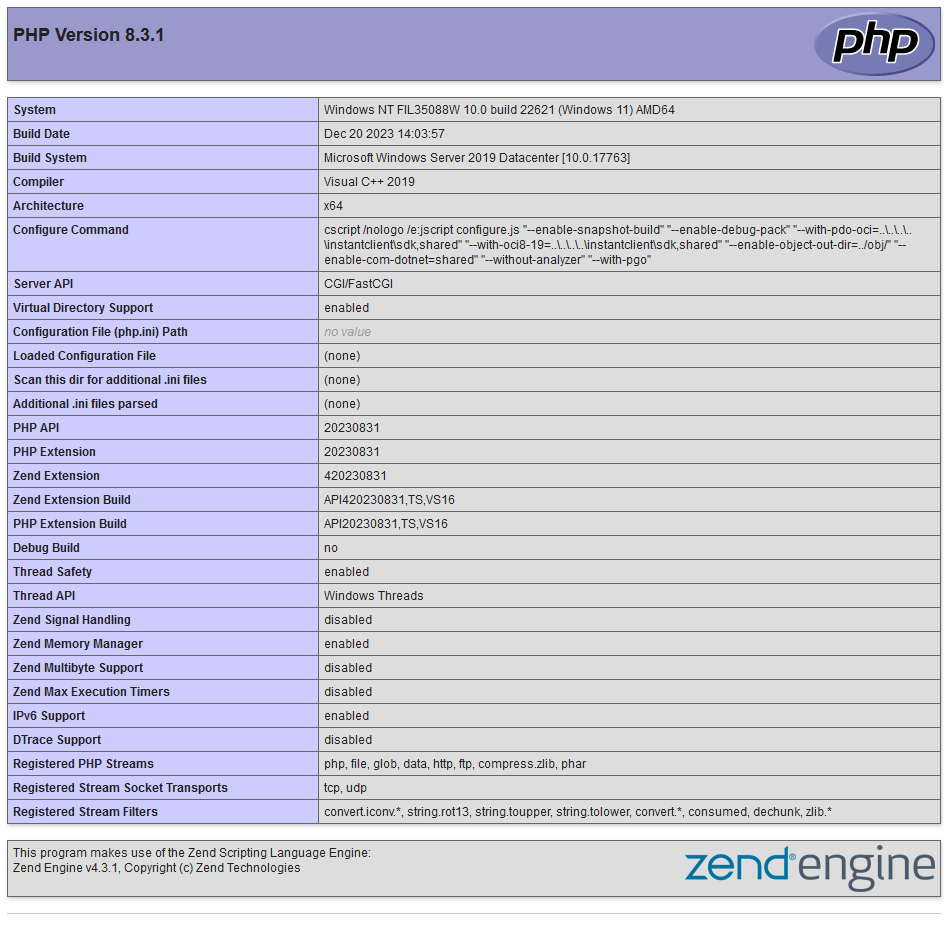
Loaded Configuration File says (none) in this screenshot: it was taken before a php.ini existed. After the step php.ini and a restart of php-cgi it shows C:\PHP\php.ini. Delete the test page afterwards; it tells everyone everything about your setup.
No input file specified, 502 Bad Gateway
With the original /scripts$fastcgi_script_name left in place, PHP looks for the file in a folder that does not exist, and every .php page answers with
HTTP/1.1 404 Not Found No input file specified.
Fix SCRIPT_FILENAME as shown above and reload Nginx.
502 Bad Gateway means that nothing listens on port 9000: php-cgi was not started, or it ended. Check:
tasklist /fi "imagename eq php-cgi.exe"
If no line is listed, run start-php-fcgi.bat again, and check that it sets PHP_FCGI_MAX_REQUESTS=0.
Stop both
nginx -s stop
taskkill /f /im php-cgi.exe
Run nginx -s stop from C:\nginx; why it matters is in Run it from its own folder.
Article authors: Andrei Olegovich, Klavdiya Kondakova
| Install Nginx on Windows | |
| nginx.conf: configuration and sites | |
| Nginx | |
| PHP |