Text Editor in PyCharm
Introduction
PyCharm is an integrated development environment for the Python programming language. It provides code analysis tools, a graphical debugger, a unit test runner, and supports web development on
Django. PyCharm is developed by JetBrains based on IntelliJ IDEA.
PyCharm is a cross-platform development environment that is compatible with
Windows, macOS,
Linux. PyCharm Community Edition (free) is licensed under the Apache License, and PyCharm Professional Edition (paid) is proprietary software.

Pycharm: Place cursor at beginning of multiple lines in a row
If you need to add or remove something from several lines that go in a row
Place the cursor in the desired place on the top line

Press CTRL then CTRL again and do not release it. Press the down arrow the required number of times.

Vertical line line length limiter
A vertical line after a certain number of characters helps to understand that
the line has become too long.
What is considered too long and what is not is usually decided on the project.
PEP 8 limits the length to 79 characters.
Limit all lines to a maximum of 79 characters.
For flowing long blocks of text with fewer structural restrictions (docstrings or comments), the line length should be limited to 72 characters.
The documentation for Django recommends a line length of up to 119 characters. This is due to a limitation in GitHub
An exception to PEP 8 is our rules on line lengths. Don’t limit lines of code to 79 characters if it means the code looks significantly uglier or is harder to read.
We allow up to 119 characters as this is the width of GitHub code review; anything longer requires horizontal scrolling which makes review more difficult.
This check is included when you run flake8. Documentation, comments, and docstrings should be wrapped at 79 characters, even though PEP 8 suggests 72.
The popular Python linter Black limits the length to 88 characters.
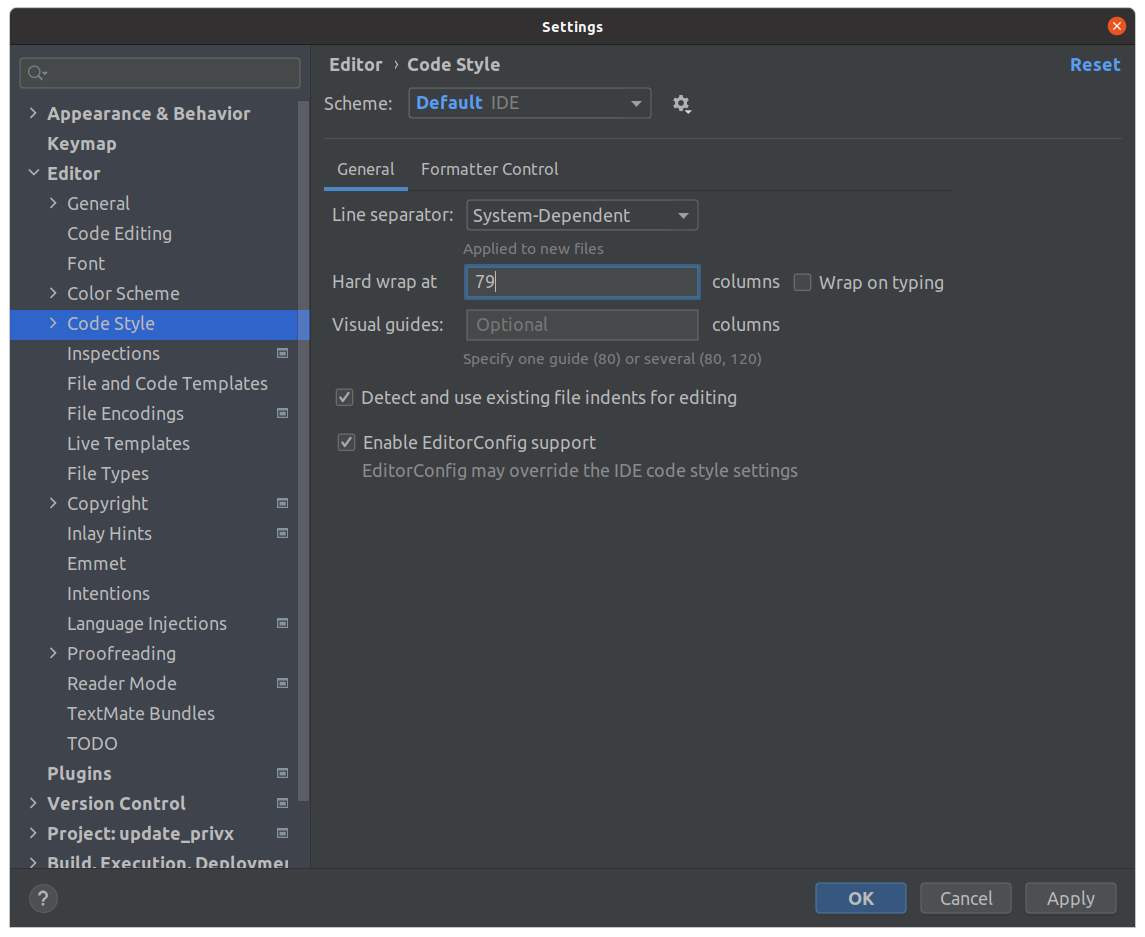
You can set the position of the vertical line in PyCharm in
File → Settings → Editor → Code Style → Hard wrap at
Split window into two parts
There are different ways to split a window into two parts
Half on the left, half on the right: select the desired tab → right-click → Split Right
Half on the bottom, half on the top: select the desired tab → right-click → Split Down
If you do this, the tab will split into two - the same file will be visible both in the old tab and in the new one (on the right or bottom)
To simply move the tab to the new half of the screen, select Split and Move Right or Split and Move Down
Switching from the terminal
To quickly switch between the terminal and the code editor, you can use the following method
Press
ALT + F12
The terminal will be hidden if active and will appear if hidden. The cursor will automatically jump back and forth.
Remove green background from code in PyCharm
If a fragment in another language is inserted into the code, PyCharm can highlight it in green.
If there is a lot of such code, it becomes unpleasant to read.
This is especially true for
Dockerfile
You can solve the problem by disabling the highlighting in the injected language fragment
Settings → Editor → Color Schema → General

Switch off Background

Comment out the highlighted code
To comment out the highlighted code, click
CTRL + /
In the same way, the selected area can be uncommented
Rename a function in a file
To quickly rename a function inside a file, select the function name and press
SHIFT + F6
The rename window will appear, in which you will be asked to replace the old function name (in the example - get_network_targets) with a new one (in the example - post_network_targets)

If you need to replace only in one file - Scope should be selected as Current File
Click Refactor
A preview will appear at the bottom right. Study it if necessary and click Do Refactor at the bottom left.
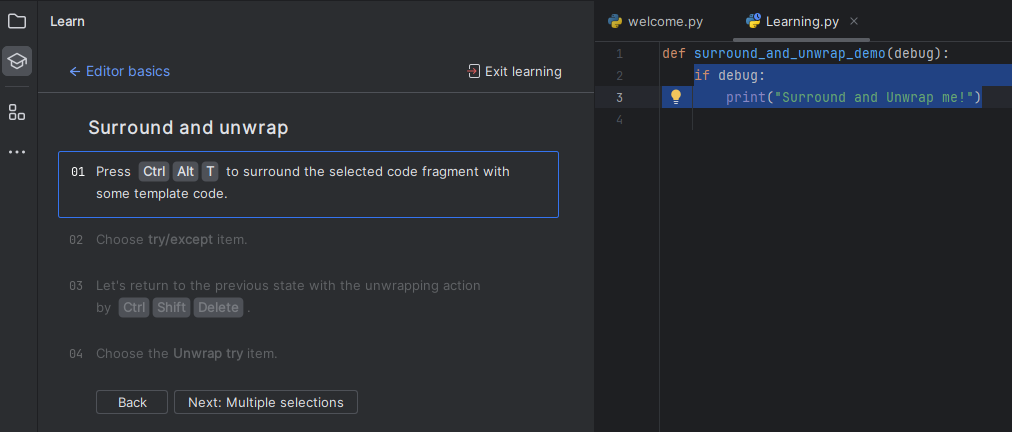
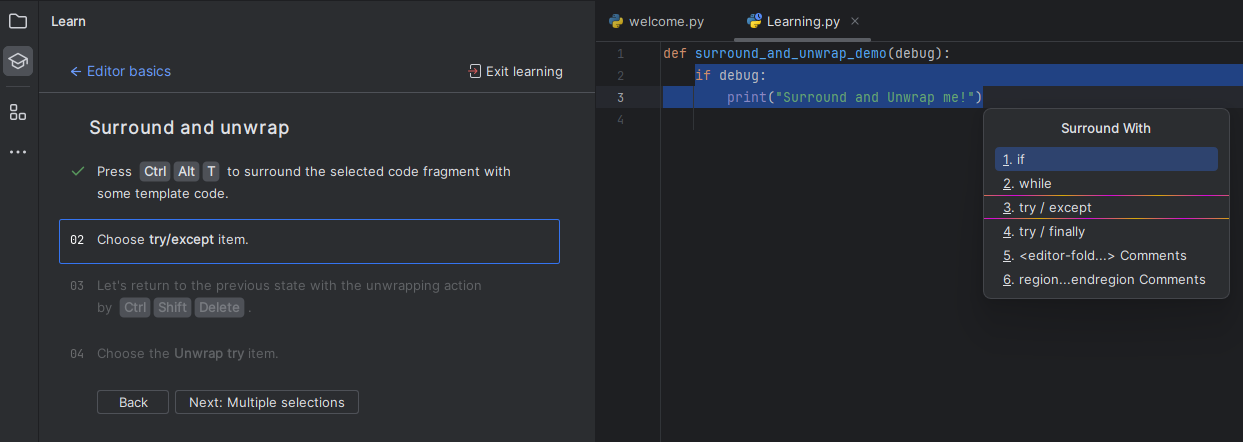
Wrap the code
Ctrl + Alt + T
Remove Wrapping
Ctrl + Shift + Delete
https://aredel.com
https://aredel.com

https://aredel.com

https://aredel.com
Article author: Andrei Olegovich
| PyCharm: IDE | |
| Install | |
| Add Path to Project | |
| Editor Basics | |
| Python | |
| Add Selenium to PyCharm |