What Is Drive B
Drive A
Drive A is a Floppy disk - that is, a diskette.
For those who have never seen them - it is
a magnetic disk in a rectangular plastic casing.
The size of the most popular
type is 3.5 inches, that is 8.89 centimetres.
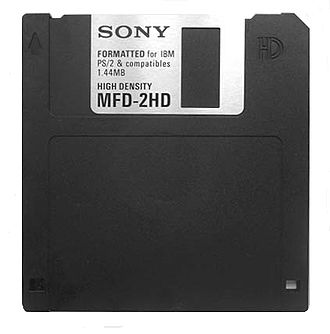
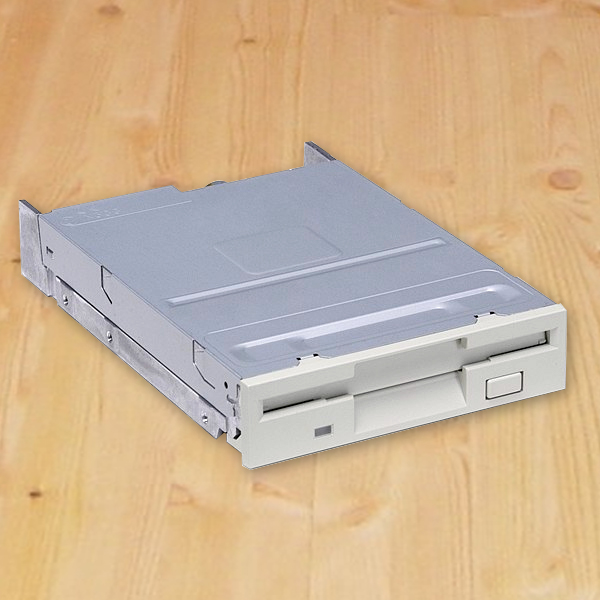
Such diskettes had to be inserted into a special drive
Drive B
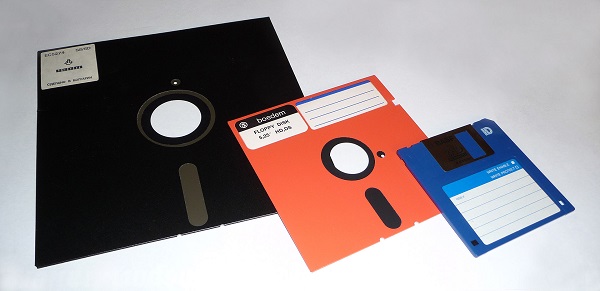
Drive B was also reserved for diskettes, only
usually of a larger size.
For example, for
a 5.25-inch or 13.34-centimetre diskette. Or for an eight-inch diskette.
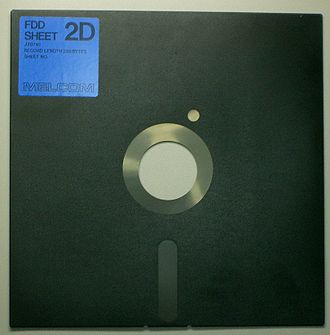
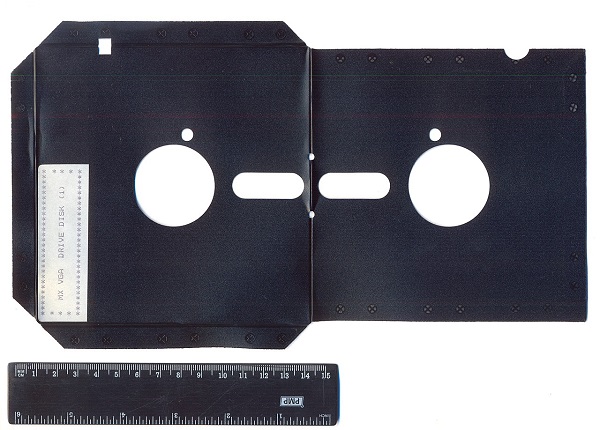
A diskette is arranged in the following original way
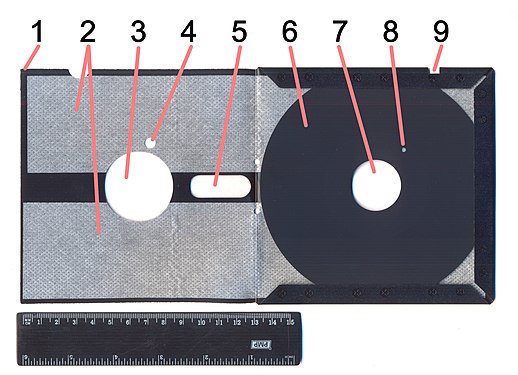
1 — case;
2 — anti-friction liners;
3 — drive spindle window;
4 — index hole window;
5 — magnetic head window;
6 — polymer disk with a magnetic coating;
7 — drive spindle hole;
8 — index hole;
9 — write protection notch
The relative size of diskettes can be judged from a joint photo.
Drive C
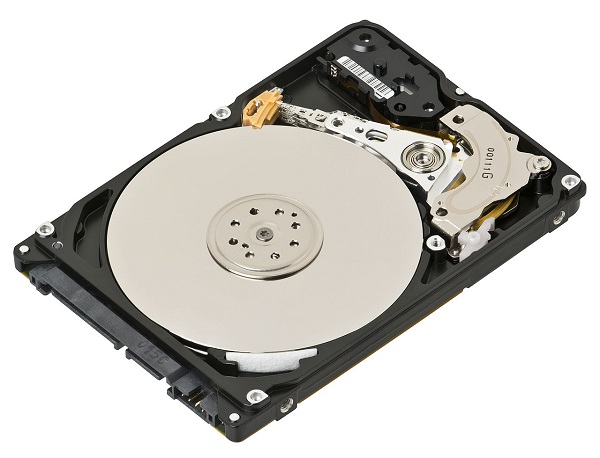
And after diskettes came drive C, which is familiar to every user even today.
For a long time all system drives were HDDs
In recent years a faster type of drive has gained popularity - the SDD.
Operating systems that use drive letter assignment
MS-DOS / PC DOS, starting from version 5.0 and later operating systems, assigns drive letters according to the following algorithm:
Assign the drive letter A: to the first floppy disk drive (drive 0), and B: to the second floppy disk drive (drive 1).
If only one physical diskette is present, drive B: will be assigned to a phantom floppy disk drive mapped
to the same physical disk and dynamically assigned either A: or B: to facilitate diskette operations.
If no physical floppy disk drive is present, DOS 4.0 will assign A: and B: to a non-existent disk, while
DOS 5.0 and above invalidates these drive letters.
If more than two physical drives are present, DOS versions before
5.0 will assign subsequent drive letters, whereas DOS 5.0 and above will reassign these drives to higher
drive letters at a later stage; see below.
Assign a drive letter to the first active primary partition recognised on the first physical hard disk. DOS 5.0
and above guarantees that it becomes drive C:, so that the boot disk will have drive A: or C:.
Assign subsequent drive letters to the first primary partition on each subsequent physical hard disk
(DOS versions before 5.0 will check only two physical hard disks, whereas DOS 5.0 and above supports
eight physical hard disks).
Assign subsequent drive letters to each recognised logical partition present in the first extended partition,
starting from the first hard disk and then through successive physical hard disks.
DOS 5.0 and above: assign drive letters to all remaining primary partitions, starting from the first hard disk and ending with
successive physical hard disks.
DOS 5.0 and above: assign drive letters to all physical drives beyond the second physical drive.
Assign subsequent drive letters to any block device drivers loaded in CONFIG.SYS with DEVICE statements,
for example, RAM disks.
Assign subsequent drive letters to any dynamically loaded drives using CONFIG.SYS INSTALL statements in AUTOEXEC.BAT
or later versions, i. e. additional optical disc drives (MSCDEX etc.), PCMCIA / PC Card drives,
USB or Firewire drives, or network drives.
Only partitions of recognised partition types are assigned letters.
In particular, «hidden partitions» (those whose type identifier
has been changed to an unrecognised value, usually by adding 10h) are not.
MS-DOS / PC DOS version 4.0 and earlier assign letters to all drives before considering hard disks, so
a system with four drives will name the first hard disk E:. Starting with DOS 5.0, the system guarantees that drive C:
is always a hard disk, even if the system has more than two physical drives.
Although, without deliberate reassignment, drive letter assignments are usually fixed until the next
reboot, Zenith MS-DOS 3.21 will update drive letter assignments upon disk reboot.
This may lead to a change of drive letters without a reboot if the hard disk partitioning has been changed.
MS-DOS on the Apricot PC assigns letters to hard disks starting from A:, before considering floppy disk drives.
A system with two of each drive will name the hard disks A: and B:, and the diskettes C: and D:.
Some versions of DOS do not assign a drive letter, starting from C:, to the first active primary partition recognised on
the first physical hard disk, but to the first primary partition recognised on the first hard disk, even if it is not active. ,
If there is more than one extended partition in the partition table, only the logical drives of the first
recognised extended partition type are processed.
Some later versions of DR-DOS IBMBIO.COM provide a pre-boot configuration structure in which
bit flags are stored to choose (among others) between different drive letter assignment strategies.
These strategies can be pre-selected by the user or the hardware manufacturer, or changed
by the boot loader on the fly when DR-DOS starts. In these cases the boot drive may also differ from A: or C:.
The order of drive letters depends on whether a given drive is controlled by a boot-time driver or a dynamically loaded
driver.
For example, if the second or third hard disk is of the SCSI type and DOS requires drivers loaded with
the CONFIG.SYS file (for example, the controller board has no built-in BIOS or using that BIOS is impractical),
then the first primary SCSI partition will appear after all IDE partitions in DOS.
Therefore DOS and, for example, OS / 2
may have different drive letters, since OS / 2 loads the SCSI driver earlier. The solution was not to use
primary partitions on such hard disks.
In Windows NT and OS / 2 the operating system uses the above-mentioned algorithm to automatically assign
letters to floppy disk drives, optical drives, boot disks and other recognised volumes that are not created
by the administrator in the operating system.
Volumes created in the operating system are specified manually, and some
automatic drive letters can be changed. Unrecognised volumes are not assigned letters and usually remain
untouched by the operating system.
A common problem that arises with drive letter assignment is that
a letter assigned to a network drive may interfere with the letter of a local volume
(for example, a recently installed CD / DVD drive or USB drive).
For example, if the last local drive is drive D: and the network drive was
assigned as E:, then a newly connected USB storage device will also
be assigned drive E:, which will lead to the loss of the connection either with the shared network
resource or with the USB device. Users with administrator rights can
assign drive letters manually to solve this problem.
Another condition that can cause problems in Windows XP is when network
drives are defined but in an error state (as on a laptop working offline).
Even if the disconnected network drive is not the next available drive letter,
Windows XP may be unable to map the drive, and this error may also prevent
a USB device from being connected.
Common Assignments
Applying the scheme considered above in a fairly modern Windows-based system usually leads to the following drive letter assignments:
A: - Floppy disk drives, 3 ½ 〞 or 5 ½ 〞 and possibly other types of drives, if any.
B: - Reserved for the second floppy disk drive (which was present on many computers).
C: - The first hard disk partition.
D: to Z: - Other disk partitions are marked here.
Windows assigns the next free letter to the next disk it encounters when enumerating the disks in the system.
Disks can be partitioned, thereby creating more drive letters.
This applies to MS-DOS as well as to all Windows operating systems. Windows offers other ways to change drive letters,
using the «Disk Management» snap-in or the disk partition. MS-DOS usually uses parameters in boot device drivers
within the CONFIG.SYS file.
Drive letters for a specific case:
F: - The first network drive when using Novell NetWare.
H: - The «home» directory on the network server.
L: - The dynamically assigned boot drive under Concurrent DOS, Multiuser DOS, System Manager and REAL / 32.
M: - The drive letter for the additional MDISK drive under Concurrent DOS.
N :, O :, P: - Floating drives assigned under CP / M-86 4.x, Personal CP / M-86 2.x, DOS Plus 1.1-2.1
(via BDOS call 0Fh); later this concept was extended to any unused drive letters under Concurrent
DOS, Multiuser DOS, System Manager, REAL / 32 and DR DOS up to 6.0.
B: - The «plug and play» virtualisation in Microsoft Office.
U: - The Unix-like unified file system with a virtual \ DEV directory
for device files under MiNT, MagiC and MultiTOS.
Z: - The first network drive if Banyan VINES is used, and the initial drive letter assignment for the network
of virtual drives in the DOSBox x86 emulator.
This is also the first letter chosen by Windows for network resources,
since it automatically selects from Z: downwards.
By default Wine maps Z: to the root of the UNIX directory tree.
When there is no second physical floppy disk drive, drive B: can be used as a «virtual» floppy disk drive
mapped to physical disk A:, as a result of which the user will be prompted to swap
diskettes each time a read or write is required, depending on what was the least recently
used, A: or B:.
This accounts for most of the functionality of two floppy disk drives on a computer that has only one.
This concept of several drive letters sharing a single
physical device (optionally with its different «views») is not limited to the first floppy disk
drive, but can also be used for other disks by configuring additional block devices
for them with the standard DOS DRIVER.SYS in CONFIG.SYS.
Network drives are often assigned letters at the end of the alphabet.
This is often done in order to distinguish them from local drives: using letters at the end reduces the risk of assignment conflicts. This is especially true when
assignment is performed automatically over the network (usually by a login script).
In most DOS systems it is impossible to have more than 26 connected disks. Atari GEMDOS supports only 16 drive letters from
A: to P: The PalmDOS PCMCIA driver stack supports drive letters 0 :, 1 :, 2 :, ... for addressing PCMCIA disk slots.
Some Novell network drivers for DOS support up to 32 drive letters in compatible DOS versions. In addition, Novell
DOS 7, OpenDOS 7.01 and DR-DOS 7.02 do support the CONFIG.SYS LASTDRIVE = 32 directive to allocate up to 32
drive letters named from A: to Z :, [:, \ :,]: , ^ :, _: and `:. (DR-DOS 7.02-7.07 also supports the HILASTDRIVE
and LASTDRIVEHIGH directives to move disk structures into upper memory.) Some DOS application programs do not expect
drive letters after Z: and will not work with them, so it is recommended to use them for special
purposes or for searching for disks.
The 4DOS command line processor from JP Software supports drive letters beyond Z: in general, but since some
letters conflict with the syntax extensions of this command line processor, they must be escaped
to be used as drive letters.
Windows 9x (MS-DOS 7.0 / MS-DOS 7.1) also added support for LASTDRIVE = 32 and LASTDRIVEHIGH = 32.
If Windows NT requires access to more file systems than Z:, volume mount points must be used.
Nevertheless, it is possible to mount drives without letters, such as 1 :, 2: or!: using the SUBST utility from the command line in
Windows XP or later (i. e. SUBST 1: C: \ TEMP),
but this is not officially supported and may break programs that assume
that all drives have letters from A: to Z:.
Article author: Andrei Olegovich