Getting started with Locust
Introduction
To start working with Locust you had to complete the following steps:
Install Locust
Do a trial run
and make sure there are no errors
Study locust --help
to know the main launch options, or at least remember where to look them up
Prepare (for example with
Flask
) a test server with a
REST API you can send lots of requests to without harming anyone
If you do not know how to make your own server - read the articles
Intro to Flask
,
First Flask project
and
Flask server on Linux + Nginx
Running the test
On 192.168.0.106 run a server, for example a
Flask server
listening on the
count_views url
To load test this
endpoint
write the code:
from locust import HttpUser, task, between
class MyWebsiteUser(HttpUser):
@task
def load_user_profile(self):
self.client.get("/count_views")
wait_time = between(1, 3)
And run
locust -f my_test.py --host=http://192.168.0.106 --headless -u 2000 -r 50
-f my_test.py means run the
my_test.py
file
If you skip it,
locustfile.py
runs by default
--host sets the address to connect to.
The code had self.client.get("/count_views")
so requests go to http://192.168.0.106/count_views/
--headless means you do not want to run the web UI. You work without a browser.
-u sets the user count (older locust versions used -c, now write -u)
-r sets how many users spawn per second. If you want 2000 users and set
-r 50, two thousand will be there in 40 seconds.
Result
After launch you will see live results in the console. While the load is small there will be no failures and the failures/s column shows zeros
Name # reqs # fails | Avg Min Max Median | req/s failures/s -------------------------------------------------------------------------------------------------------------------------------------------- GET /count_views 191 0(0.00%) | 45 14 342 46 | 0.30 0.00 -------------------------------------------------------------------------------------------------------------------------------------------- Aggregated 191 0(0.00%) | 45 14 342 46 | 0.30 0.00
As the load grows the first failures appear
Name # reqs # fails | Avg Min Max Median | req/s failures/s -------------------------------------------------------------------------------------------------------------------------------------------- GET /count_views 8751 19(0.22%) | 1046 0 9625 910 | 137.50 0.10 -------------------------------------------------------------------------------------------------------------------------------------------- Aggregated 8751 19(0.22%) | 1046 0 9625 910 | 137.50 0.10
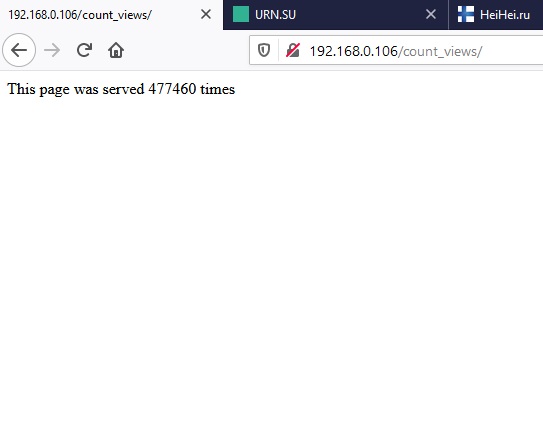
If you built the server following my «Flask visit counter» guide you can open the server port 80 in a browser and see how many hits have been made already
Task selection
To run only some tasks you can use the tag module
Plug in tag and add
@tag('tag_name')
before every @task.
There can be several tags @tag('tag1', 'tag1', 'newTag1')
Example: the
using_tags.py
file
from locust import User, task, tag, between
class MyWebsiteUser(User):
@tag('tag0')
@task
def task_0(self):
print("Task 0 was performed")
@tag('tag1')
@task
def task_1(self):
print("Task 1 was performed")
@tag('tag2')
@task
def task_2(self):
print("Task 2 was performed")
@tag('tag1', 'tag2', 'tag3')
@task
def task_3(self):
print("Task 3 was performed")
wait_time = between(2, 3)
To run all tasks just launch the file as in the previous example.
If you need, say, only task_1 and task_3
note they share the tag1 tag
So appending --tags tag1 is enough
locust -f using_tags.py --host=http://192.168.0.106 --headless --tags tag1 -u 1
Check the result in the terminal
[2020-11-04 13:34:09,675] DESKTOP-OP43ER5/INFO/locust.main: Starting Locust 1.3.1 [2020-11-04 13:34:09,675] DESKTOP-OP43ER5/INFO/locust.runners: Spawning 1 users at the rate 1 users/s (0 users already running)... [2020-11-04 13:34:09,675] DESKTOP-OP43ER5/INFO/locust.runners: All users spawned: MyWebsiteUser: 1 (0 already running) Name # reqs # fails | Avg Min Max Median | req/s failures/s -------------------------------------------------------------------------------------------------------------------------------------------- -------------------------------------------------------------------------------------------------------------------------------------------- Aggregated 0 0(0.00%) | 0 0 0 0 | 0.00 0.00 Task 1 was performed Name # reqs # fails | Avg Min Max Median | req/s failures/s -------------------------------------------------------------------------------------------------------------------------------------------- -------------------------------------------------------------------------------------------------------------------------------------------- Aggregated 0 0(0.00%) | 0 0 0 0 | 0.00 0.00 Task 1 was performed Name # reqs # fails | Avg Min Max Median | req/s failures/s -------------------------------------------------------------------------------------------------------------------------------------------- -------------------------------------------------------------------------------------------------------------------------------------------- Aggregated 0 0(0.00%) | 0 0 0 0 | 0.00 0.00 Task 3 was performed Name # reqs # fails | Avg Min Max Median | req/s failures/s -------------------------------------------------------------------------------------------------------------------------------------------- -------------------------------------------------------------------------------------------------------------------------------------------- Aggregated 0 0(0.00%) | 0 0 0 0 | 0.00 0.00
As you can see for yourself, task_0 and task_2 never ran
Priority
Suppose you have two tasks but one must run five times more often than the other.
Solve it by weighting each task in brackets after the declaration: @task(10)
Copy the code of the weight.py file
from locust import User, task, tag, between
class MyWebsiteUser(User):
@task(4)
def task_0(self):
print("Task 0 was performed")
@task(1)
def task_1(self):
print("Task 1 was performed")
wait_time = between(2, 3)
locust -f weigth.py --host=http://192.168.0.106 --headless -u 1
task_0 will run four times more often than task_1
Article author: Andrei Olegovich
