Software Testing Basics

The purpose of a tester's work
Why do you need to test software??
Now it is year 2026 and this question is asked less often, but you need to know the answer to it.
If you test your own software, you know better.
If you work as a tester in some project, then your goal
is to provide the most objective information about the software to your
manager, who will decide whether such software can be sent to production
or not so that the company can earn more money.
A tester is generally needed by a business in order to relieve developers of the simplest work.
Simply because a tester's time is cheaper.
This is an economical explanation why companies tend to hire dedicated testers instead of using developers.
If we talk about the abstract purpose of testing - it is mostly in collecting info on how software works in reality.
Before making any desicion on your software you better learn all the staff that is important for you. Sometimes it is
finding as much bugs as possible, sometimes it is something else.
Monitoring Logs

If you have problems with the software, the first thing to do is to study the logs.
What a log is
If you started doing IT quite recently and do not know what logs are, let me explain in a few words.
Logs are usually text files in which programs record the results of their work.
What logs are like
A log can be detailed; then it takes up more disk space and consumes more resources.
To reduce the space taken up, you can record only the most important events.
The same software can have several logging modes. The mode is set in the settings and differs in the level of detail.
The degree of detail can vary very much. From no or minimal records such as
2022-03-22-10-06-01T Turned on
2026-11-14-00-00-01T Turned off
Up to recording every action.
Often the same program can be given a different level of log verbosity.
Typical log levels — detail grows from left to right
FATAL - ALERT - CRITICAL - ERROR - WARN - INFO - DEBUG - TRACE -
For example, if the INFO mode is used, then all FATAL, ALERT, CRITICAL, ERROR, WARN and INFO messages will be recorded. DEBUG and TRACE will not be recorded.
Far from always are all levels used.
For example, take
Python
and its built-in
logging
module: there are only five levels, two of which (INFO and DEBUG) are disabled by default
CRITICAL - ERROR - WARN - INFO - DEBUG
In Nginx eight levels are used
emerg - alert - crit - error - warn - notice - info - debug -
A common practice in a tester's work is to enable detailed logging for the duration of testing — from DEBUG and above.
Then return the settings to INFO or WARN to save space.
To work with logs, knowledge of scripting programming languages, or text preprocessors, may come in handy (sed,
grep,
awk)
Example: show only today's ERROR and WARNING lines from the log, as well as those containing the word panic
grep '2026-11-14' topbicycle.log | grep -E 'ERROR|WARNING|*panic*'
An example of logging function calls with the help of decorators can be found in the article «Decorators in Python»
Where logs are stored in Windows
A log file is usually named by date, for example
2026-11-14-heiheiru-log.txt
or
2026-11-14-heiheiru.log
The location of the log file usually depends on the specific project, for example:
One client may have logs in
C:\Users\Andrei\AppData \Roaming\AO\AO_Client\logs
and another in
C:\ProgramData\AO2\AOClientPC
Glassfish on a Windows server may write to
C:\glassfish4\glassfish\domains\domain1\config\project-2026-11-14.log
Where logs are stored in Linux
In Linux system logs are located in
/var/log/
For example, the log of the utility cron for today is located in
/var/log/cron-20261114
Sometimes it is easier to ask the developer where the logs are
It is often useful to see exactly what the client is trying to send to the server.
Open the logs with
Notepad++
and search for the word POST
I advise you not to neglect the option Find All in Current Document.
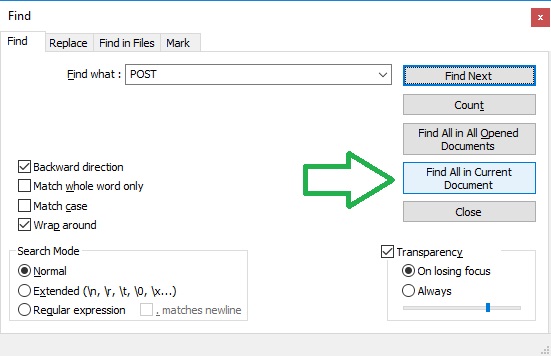
Often there is no point in looking at the full log. It may contain a lot of garbage, which is easy to remove with the help of text preprocessors.
You can read about how to do this in the articles:
I also recommend reading the article «Viewing and configuring Linux logs» on the site beget.com
Who should read logs: the tester or the developer
Once I was asked this question, and here I am quite categorical — of course, the tester.
Logs exist so that when the software works incorrectly, the tester can, for example by timestamp, find the problematic place and attach the needed piece of the log to the bug report.
Of course, the developer can do all this himself. But his time is more expensive, and it is more profitable for the business that everything that can be done by a tester is done by the tester.
Testing user input
If there is even a small chance that you will test something related to user input, read the article Big List of Naughty Strings
Learning specifications
Before starting work on a new project, you will need to study one or several specifications.
Several — because a project may have a specification that describes the business logic, an interface specification and, for example, documentation for supporting the project.
Which information goes into one specification and which into another often depends on the manager leading the project, or may be clearly prescribed in corporate rules.
Interfaces — interface specification
In any case, in the interface specification we expect to see a description of API and the tester's task here comes down to the following:
- Link the business logic with the requests described in the interface specification.
- Check the quality of the specification, namely clarify whether the developers forgot to describe some action. How clear the names of the requests are, etc.
Since the logic of developers differs from the logic of testers, it is sometimes useful to clarify which of the listed requests are created directly by clients and which are secondary, that is, require a trigger request that comes from the client or the backend.
The result of checking the interface specification will be a map drawn up as a document, or simply in the tester's imagination, which superimposes on the business processes the corresponding requests or chains of requests.
Version control
In the past, various solutions were used for version control, for example
SVN
, but for quite a long time the standard has been
GIT
so I advise you to study exactly that.
There are quite a lot of guides and training materials; you can find mine in the article
«GIT for beginners»
gitlab-basics
requestb.in
en.wikipedia.org/wiki/Test_stub
JSON validator
What a tester does
It should be remembered that testing strongly depends on which company the tester works for.
This is obvious, but nevertheless I emphasize that it is very difficult to become a universal tester, unless you change several employers from different IT fields.
I read some job postings on the Russian internet and on LinkedIn and made a selection of popular requirements and descriptions of tasks.
I will try to translate them into a language a beginner can understand.
Testing individual tasks in test and production environments
This means that you will sometimes have to test in production — that is, not the dev but the prod version.
If you are testing a server hosted by your company, the only difference is responsibility.
If the server is on the client's side, get ready to connect via VPN, set up SSH tunnel, and in the worst case — to deal with SSL certificates.
Covering the functionality of the system with test cases
It means that you need to study the specification and understand what can be tested. Then describe these tests.
Checking incoming bug reports from Tech Support
Clients usually complain about bugs, and not only about bugs.
Support cannot always quickly figure out what is what, so it is easier to forward the bug report to the tester who is familiar with the project.
You check whether the bug is reproduced in the test environment; if not, you dig through production logs somewhere on Kibana.
Functional testing and tracking the quality of the released service
Everything is clear here — you need to check whether the product performs its function. After that, check how well and conveniently it does so for the user
Analyzing the functionality of the service
It can mean anything. It looks more like a task for exploratory testing.
Communicating with the development team and managers, making joint decisions about improving the service.
This is an integral part of the work of almost any testing engineer, and not only of software.
Localizing and documenting defects.
Localization usually means finding out the source of the problem. This results in searching for the logs related directly to the error and tracking the stack trace.
Documentation means: describe what causes the bug, which client action or which exact request. The maximum amount of useful information is welcome.
Be sure to specify the software version in which the bug was obtained and attach the logs.
Optimizing the testing process within the team and setting tasks for automation test developers
It implies that the manual tester should communicate with the automation tester and ask him to develop automation tools. Then these tools need to be studied, applied and described — see the next point.
Running and analyzing the results of automated tests
This is the obvious continuation of the previous point.
Performing manual functional testing
We have already discussed functional testing; in this point the key word is manual. You will need to click with the mouse, make requests to the API, press buttons — it all depends on the product. If your company makes fly swatters — you may have to swat flies.
Participating in regression testing
Regression testing usually means the following.
You already have a working product, but a Change Request (CR) came in for it and the developers made a new feature.
The feature works, but now you need to understand whether the new feature broke something in the old functionality.
For this you will have to perform all the known manipulations with the product. Usually there is a separate document for the Regression Test; if you came up with something new — you just add it there. A rather boring process.
Maintaining test documentation, preparing test cases
Routine work that is unavoidable, especially in large companies.
Registering found defects in the bug tracker, monitoring their fixing.
The purpose of bug trackers is to simplify control over errors.
There are a lot of trackers; one of the most popular is
Jira
.
You can study an incomplete
list of bug trackers
.
If you are not familiar with the principles of their work, I recommend studying Jira, and in advance — so as not to have an unnecessary gap in your resume. Write in the comments what your company uses.
Interaction with the development team.
Interacting with developers is fun. An example from life: an unknown error was found in the logs
2019-01-10 10:01:15 [ERROR]: Something is not ok
A report was written about it. The developer released a fix. The tester checked and, no longer seeing this warning in the logs, accepted it.
A week passed, the tester is testing a completely different story and suddenly
2019-01-17 10:01:15 [DEBUG]: Something is not ok
The tester calls the developer and says that the error has appeared again.
The developer's first question is «At what log level are you looking?»
It turned out that the developer had simply buried this error deeper — now it is not visible at the ERROR log level but only at DEBUG.
What a fix.
Send your stories in the comments. I will include the best ones in the article.
Where tasks and/or bugs are stored
List of project planners and bug trackers:
- Jira
- Trello
- Pivotal Tracker
- Bugzilla
- CA
- Asana
- Basecamp
- Redmine
- Team Foundation Server
- FogBugz
- GitHub Issues
- Axosoft
- Mantis
- Trac
- Yodiz
- YouTrack
Pairwise and overall comparison:
On the wikipedia site
On the softwareinsider.com site
, for example
Jira vs. Yodiz
On the Jira site
Where documentation is written
Test automation
This chapter has grown too large and has moved to a separate page
«Automation»
Useful for a tester
To have:
work experience with scrum or knowledge of the theory of this methodology
Understanding of the development and testing process;
knowledge and understanding of the processes
Agile
For frontend testers, experience testing the frontend of client applications will be useful.
To know:
what regression is
smoke/UAT testing
positive/negative test cases
test suites
test runs
about boundary values,
about input data types,
about the need to match design mockups in testing.
bug tracking systems (JIRA or others);
Basic Linux commands — read my article
Bash Commands for a Tester
English — read my article
Tips for learning English
To be able to:
- Work with version control systems (usually GIT less often SVN)
- Work with Chrome Devtools
- Express your thoughts clearly and distinctly
- Write scripts in one of the popular programming languages (for example in Python )
What qualities a tester should have
The necessary qualities can be divided into several groups.
The first is related to the specifics of the work: you need to constantly look for some shortcomings; to succeed in this activity you need character traits usually described by one of the terms listed below.
- Scrupulousness
- Attention to detail
- Neatness
- Punctiliousness
- Persistence
A tester works in tandem with several specialists of different profiles: developers, managers, other testers.
What is needed for successful interaction with them is usually described as
- Ability to work in a team
- Willingness and ability to work in a dynamic team (HRs write that too)
- Responsibility
- Independence in decision-making (at a level closer to Senior)
- Initiative
If the product is developing quickly, or is quite complex, or the tester is hired with the aim of creating a QA department from scratch — the important ones will be
- Striving for development
- Good learnability
Some employers also list universal human qualities, possessing which the tester will find it easier to join the team. These qualities are needed in almost all professions
- Sense of humor.
- Non-conflictness
How to ask questions
I will give a concrete example so that you know what to be prepared for.
You are looking for a test that checks whether the value of the variable is correct
floating_value
You went, for example, to
GitHub
or
GitLab
and in the directory tests you search by the word floating_value
you find nothing and decide to shorten the word to float
maybe the variable is named differently.
You find nothing and write to the developer or the QA lead
First option
So and so, I looked in the tests at https://company.gitlab.com for a test on floating_value. By the keyword float there is nothing at all.
You get the answer
The keyword float is a bad choice — search by floating_value
Second option
So and so, I looked in the tests at https://company.gitlab.com for a test on floating_value. By the keyword floating_value there is nothing at all.
You get the answer
Try searching more broadly, for example float
How you should have written
So and so, I looked in the tests at https://company.gitlab.com for a test on floating_value. By the keywords floating_value and even float there is nothing at all.
Conclusion: Do not leave the addressee extra room for maneuver
Books and articles about testing
Just a few books. I do not recommend any, since I myself have not yet been able to make myself read them. Write in the comments if you want to recommend something.
- Cem Kaner, Jack Falk, Hung Quoc Nguyen - Testing Computer Software
- Lee Copeland - A Practitioner's Guide to Software Test Design
- Ron Patton - Software Testing
Tester's dictionary
The terms are not in alphabetical order but by meaning. First the basics, and then those that build on it.
Objective evidence
(Objective Evidence)
Objective evidence describes what the tester observed, what actually happened or did not happen.
Objective evidence must contain sufficient data for the reviewer to prove its compliance with the Acceptance Criteria of the test.
Comparing objective evidence with the acceptance criteria leads to the test passing or failing.
It should be kept in mind that statements such as Passed, Failed and As Expected are never regarded as objective evidence of a completed test.
Design verification
(Design Verification)
Confirmation by expertise and the provision of objective evidence that the specified requirements are met.
Verification activities are carried out at several stages and levels of device design.
Verification activities may include tests, inspections/reviews and analyses.
These verification activities ensure correspondence between the input requirement of the project and its output result.
Design validation
(Design Validation)
Validation means confirmation, by expertise and the provision of objective evidence, that the specific requirements for a specific intended use can be consistently fulfilled.
Design validation means establishing, by means of objective evidence, that the technical characteristics of the device meet the user's needs and the intended use.
See what boring and not entirely clear definitions are given above?
If during an interview they start loading you with such information — most likely the job will not be very interesting.
Cherry Picking
Choosing features for the next release, details here

Test result
It should include:
An explicit indication of which object was tested. That is, the name of the device or program, the version and everything necessary for unambiguous identification.
The identification number of the test case that was run. This is especially relevant for large companies with extensive test libraries.
The date the test was conducted.
A description of the test environment used during testing. For example, the type of computer.
The conclusion on the Success/Failure of the test. The so-called Pass/Fail statement
Objective Evidence
The list of found defects in case of test failure.
How to write a test report
There are different views on how to formulate the results. Some like the Passive Voice, while others write in the first person.
An example illustrating the advantages of the latter
First person
In Settings Menu changed MegaFactor 1 from 0.5 to 0.6 and MegaFactor 2 from 0.01 to 0.02
Passive voice
In Settings Menu MegaFactor 1 was changed from 0.5 to 0.6 and MegaFactor 2 was changed from 0.01 to 0.02
As you can see, the first option is shorter.
Article author: Andrei Olegovich